Prepared by SawangVille Tech Ventures Sdn BhdReg. No. 202601003133 (1665230-D)Confidential website proposal for MC Chua, Vista Preschool, Melaka. Not for redistribution or reuse without permission.
Prepared for MC Chua · Vista Preschool, Melaka · Proposal & Wireframe
A new website that nurtures,empowers and inspires.
A proposed five-page website for Vista Preschool in Melaka. It introduces the school, its programmes and its learning environment, and turns every visit into a WhatsApp conversation or a school visit.
Draft 3 · 16 October 2026 · Now with two full homepage designs to choose from · Built around your logo and its five characters. Anything marked [like this] is content we need from Vista. We have not invented any facts about your school.
PRESCHOOL
NURTURE | EMPOWER | INSPIRE
Your five letter characters, animated. A taste of the website’s personality.
★ New
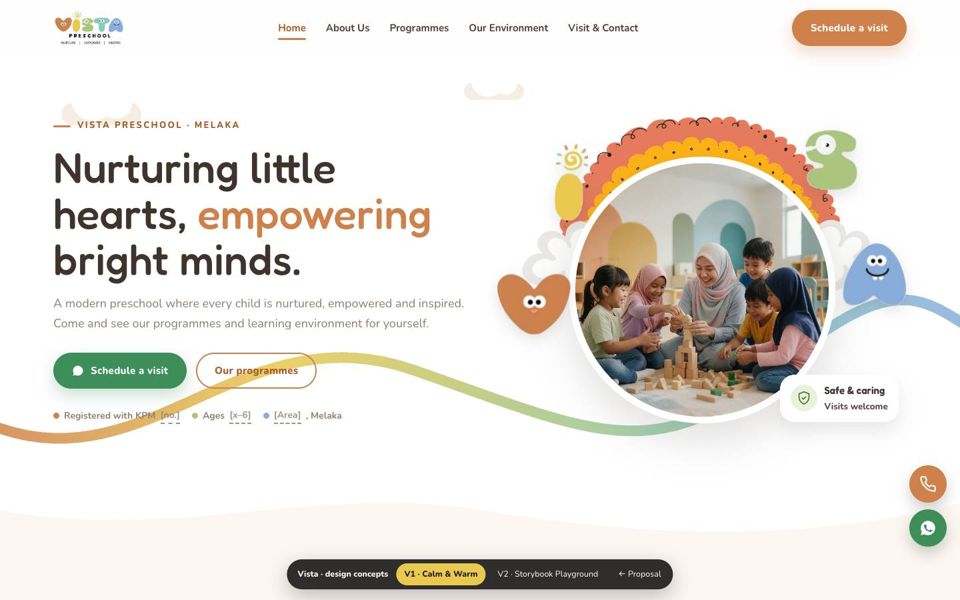
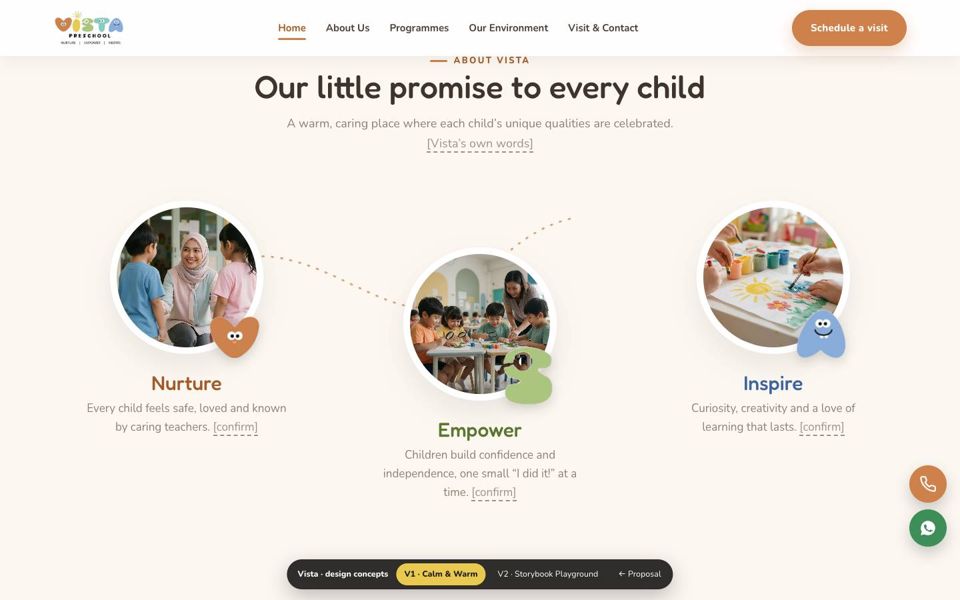
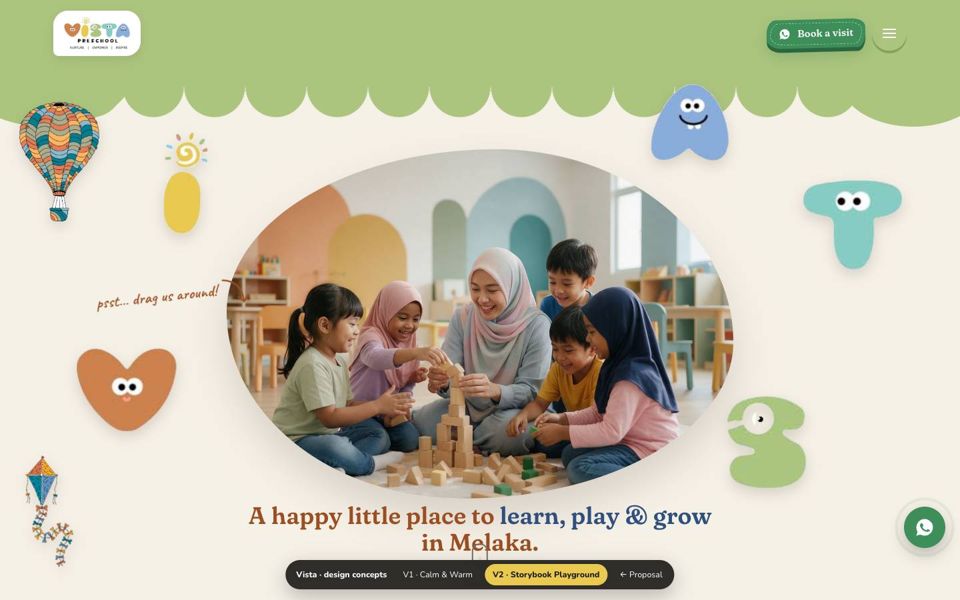
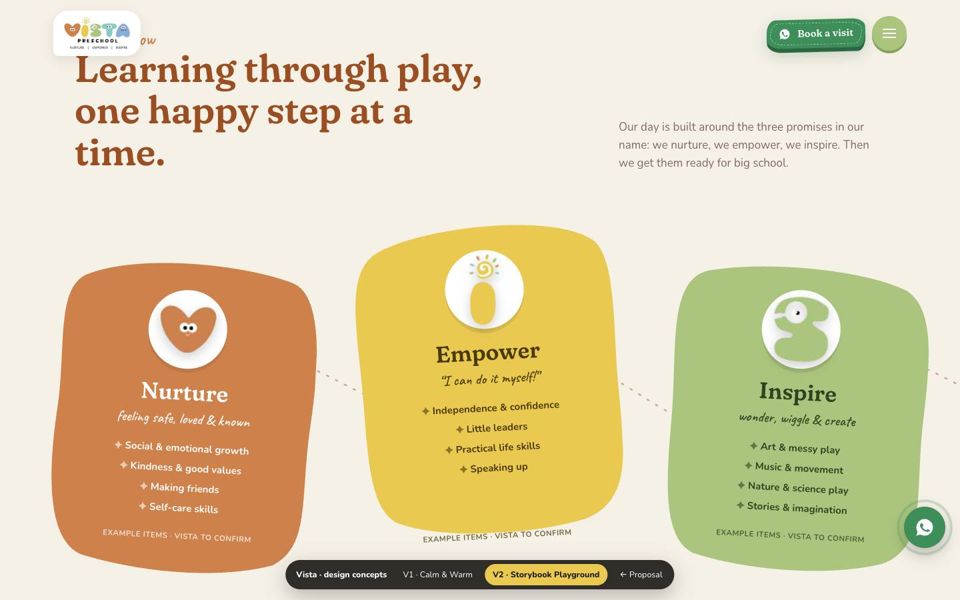
Two homepage designs to choose from
Following our meeting, here are two complete, clickable homepage designs for Vista. Same content and structure, two different personalities. Open each one on a laptop, scroll slowly, and try dragging things around.
Both designs work on phones too. Photos are sample images to show the mood; they will be replaced with Vista’s own photos. Either design can be built on the packages in section 09.
01
Your brief, in your words
Five things you asked for, and how this proposal answers each one.
Introduce our school, programmes and learning environment
AnswerOne page for each: About Us, Programmes and Our Environment, all summarised on the Home page.
Let parents enquire or book a visit through WhatsApp
AnswerEvery button opens WhatsApp with a ready-written message, so parents only press send (section 05).
AnswerA design built from your logo, with its five characters as the animated stars (sections 06–07).
Own the website and be able to move it to another host
AnswerDomain and hosting in Vista’s name, built on open-source WordPress, with a full backup handed over (section 09).
02
Your reference: Junior A.R.K
We studied all five pages of junior-ark.edu.my, a nursery and preschool in Bayan Lepas, Penang. It is a good choice of reference: warm, calm and built around one theme. Below is what we would carry over to Vista, and where Vista’s site can go further.
Worth carrying over
WhatsApp on every page. Every parent button (“Schedule a visit”, “Book a school tour”) goes to one WhatsApp chat.
Clear age groups. Nursery (15 months–3 years) and Pre-school (4–6 years) are shown as tabs.
“A Day at Junior ARK”. Daily meals are shown, which is something parents ask about.
Health and safety section and a founder profile with credentials.
A simple 3-step admissions explainer (book a tour → tour with the principal → apply) and an FAQ.
One consistent theme (the ark), with hand-drawn dotted lines that connect sections.
Where Vista can go further
Lighter pages. The home page loads about 109 MB, mostly six animated GIFs. Vista’s animation will be drawn in code, so it stays fast on mobile data.
A fallback channel. There is no phone number, email or map anywhere. Vista’s site shows all three next to WhatsApp.
Registration up front. A KPM / JPN Melaka registration badge in the first screen, the first thing parents are told to check.
About Us in the menu. On the reference it sits only in the footer, while “Join Our Team” takes a main menu slot.
Pre-written WhatsApp messages that say which programme or question the parent is asking about, so replies are quicker.
A cast of characters. Vista’s logo already has five friendly letter characters. They can greet, guide and celebrate across the site.
Reference home page
≈ 109 MB
About 53 images, including GIFs of 13–29 MB each.
Vista home page target
under 3 MB
Compressed WebP photos, with animation drawn in SVG and code.
03
Benchmarks
Other preschool sites we studied alongside your reference: two Malaysian chains that parents in Melaka will know, and two international schools that do the visit-booking journey well.
What parents look forThe common patternacross all five
Licensing and safety near the top, real photos of the space, teachers and a daily routine, then one clear “book a visit” step repeated on every page.
04
Sitemap — five pages
Five pages, one job each, and each with its own colour from your logo. The Home page gives parents the whole story in one scroll; the inner pages answer the deeper questions. A WhatsApp button floats on every page.
WhatsApp button on every page
HOME
About Us
Our story & principal
Philosophy · vision · mission
Our teachers
Registration & safety
Programmes
Each age group
Learning approach
A day at Vista
Ask about this programme
Our Environment
Classrooms & spaces
Outdoor play
Short video walkthrough
Photo gallery
Visit & Contact
How to join (3 steps)
WhatsApp · phone · email
Map & directions
FAQ
Also on your reference site Added for Vista
05
The parent journey
Choosing a preschool is a trust decision. The site is ordered the way a parent decides: first “is it safe and real?”, then “can I picture my child here?”, then “how do I take the next step?”.
Step 1
Find
From Google, Facebook or a friend’s link, mostly on a phone.
Step 2
Trust
Registration, safety, teachers and real photos in the first scrolls.
Step 3
Picture it
Programmes by age, a day at Vista, and the spaces their child would use.
Step 4
WhatsApp
One tap opens a message that is already written.
Step 5
Visit
Your team confirms a time; the parent visits with their child.
Every button sends a different ready-written message
We use free WhatsApp “click-to-chat” links, so there is no monthly fee or extra app. Each button opens Vista’s WhatsApp with a message that already says what the parent wants. Your team sees at a glance whether it is a visit request or a programme question.
Book a visit
“Hi Vista Preschool! I’d like to book a school visit. My child’s age: __ Preferred day: __”
Programme card
“Hi! I’d like to know more about the [programme name] programme.”
Fees question
“Hi! Could you share the fees for [year] intake?”
Tip: with the free WhatsApp Business app, your team can set quick replies (for example a fee sheet and available visit slots) and an away message outside school hours.
Vista PreschoolBusiness account
Hi Vista Preschool! I’d like to book a school visit. My child’s age: 4 Preferred day: Saturday morning9:41
Hello! Thank you for your interest 😊 We have visit slots on [day / time]. Which suits you?9:43
Saturday 10am please 🙏9:44
Message
06
Design direction — built from your logo
Your logo already gives the website its personality: five soft colours, rounded letters with faces, and the promise “Nurture, Empower, Inspire”. We take all three straight into the design.
Heart orange#CE814B
Sunshine yellow#E9C950
Leaf green#ABC57E
Sea teal#87CBC4
Sky blue#88ACDD
Wordmark ink#1D1C1A
Your reference — Merriweather + Cabin
Headline
A happy place to learn, play and grow.
Body
Parents can enquire or book a visit through WhatsApp in one tap.
Palette
Elegant and calm. The serif feels more “academy” than “playroom”, which suits Junior A.R.K’s positioning.
Proposed for Vista — Fredoka + Nunito
Headline · Fredoka
A happy place to learn, play and grow.
Body · Nunito
Parents can enquire or book a visit through WhatsApp in one tap.
Palette · from your logo
Fredoka’s rounded letters echo your “PRESCHOOL” wordmark, and Nunito matches the clean tagline. Version 2 swaps the headings for Fraunces, a soft storybook serif, as a free alternative to the paid font FunHome uses. All are free Google Fonts, so there is no licence to buy or renew.
07
Animation — what moves in each version
Both versions use light, code-drawn animation (GSAP and SVG), not heavy GIFs, so pages stay fast on mobile data. Motion switches off for visitors who set “reduce motion” on their phone.
Version 1 · Calm & Warm
Colour wave draws itself
A line in your five colours sweeps across the first screen as the page opens.
Dotted paths on scroll
Nurture, Empower and Inspire are joined by a path that draws as parents scroll.
A day that fills in
The daily timeline colours in, step by step.
Gentle touches
Drifting clouds, bobbing characters and soft fade-ins.
Version 2 · Storybook Playground
Drag the characters
The VISTA letters, balloon and kite are stickers parents can move around.
A promise that builds
“Nurtured, empowered & inspired” appears word by word while the page pauses.
Cards glide sideways
The learning cards slide across as you scroll down, linked by a dotted trail.
Follow the sun
A smiling sun travels across the school day and sets behind the hills.
08
Inside the other four pages
The two designs above show the Home page. The other four pages follow the style of the version you choose, with these blocks from top to bottom. Items in [brackets] need content from Vista.
Page 02About Us
Page banner with a photo of the school
Our story and a welcome from the principal [from Vista]
Philosophy, vision and mission
Our teachers: photo, role and qualification
“At a glance”: KPM registration, ages, ratio, languages
Book a visit on WhatsApp
Page 03Programmes
Age-group tabs, one per programme
For each: what children learn, session, hours, class ratio
Our learning approach
A day at Vista and a sample weekly menu
“Ask about this programme” on WhatsApp
Page 04Our Environment
Short video walkthrough (30–60 s, hosted on YouTube)
Two options built on our Corporate Website package. Both include the five pages above, a custom design in Vista’s colours, mobile-first build and the WhatsApp journey. The difference is the animation.
Option A · Essential
RM 5,500
Custom five-page school website with light animation.
5 pages designed for Vista (the package allows up to 10, so there is room to grow)
Custom design in Vista’s colours on WordPress, mobile-first
WhatsApp buttons with pre-written messages, phone, email, map
Light entrance animations and hover effects
Basic SEO and Google Analytics setup
Free domain & hosting for year 1
Online training so your team can update text and photos
Corporate Website package, new build
RECOMMENDED
Option B · Signature
RM 7,000
Everything in Essential, plus the full animation of the design you choose (section 07).
Everything in Option A
Signature animation: V1’s drawn waves and paths, or V2’s draggable characters, sideways cards and sun arc
VISTA characters animated: hop in on the first screen and appear across the pages
Animated daily-routine flow and step arrows
Built with GSAP and SVG, so it stays light and fast on phones
CopywritingWe write the page text from a short interview with you
RM 200 / page
Bilingual site (English + Bahasa Melayu)Language switch on every page
from RM 3,000
Extra pagee.g. Admissions, Events or Careers
from RM 300 / page
Yearly costs from year 2
Item
Per year
Domain — your choice of one.edu.my ≈ RM 80 or .com.my ≈ RM 60, in Vista’s name (see “Choose your domain” below)
≈ RM 60 – 80
Web hosting (cPanel)Small-site plan with a Malaysian host, in Vista’s name
≈ RM 200 – 350
Must-have yearly total
≈ RM 260 – 430
Optional: Care & Maintenance planUpdates, weekly backups, uptime monitoring, 2 hrs/month of content changes
RM 650 / month
Domain and hosting are paid directly to the provider at their published rates (estimates based on October 2026 prices). Without a care plan, your team can update the site after training, and we can help on request.
Choose your domain — two options
vistapreschool.edu.my
≈ RM 80 / year · for registered schools, the same type of address as your reference (junior-ark.edu.my)
Signals to parents that Vista is a registered education institution
Open to private kindergartens registered with JPN / KPM
Needs the JPN Perakuan Pendaftaran; the registrant name must match it exactly
Registered through MYNIC after document checks, so allow a few extra days
Best if Vista holds a JPN / KPM registration certificate.
vistapreschool.com.my
≈ RM 60 / year · the standard Malaysian business address
Quick to register with your SSM details, usually within a day
Familiar and easy for parents to remember
Works whether Vista is registered as a tadika (KPM) or a taska (JKM)
Does not carry the education-only signal of .edu.my
Best if you want to launch without waiting for school documents.
Either way the domain is registered in Vista’s name, and the website is the same. If the exact name is taken, we will suggest close alternatives before registering.
Home page design and the character animation for your approval.
Vista: feedback & approval
Weeks 3–4
Develop
Build all five pages, animation, WhatsApp links and testing on phones.
Vista: final text & photos
Week 5
Launch
Go live, training session and full handover.
Vista: final review
Deposit receivedWebsite live
The timeline starts when the deposit and the main content (photos, programme details) are received. Feedback that takes longer moves the launch date by the same amount.
You own it, and you can move it
Domain in Vista’s name
Registered under the school’s own name, whether .edu.my or .com.my. Nobody else can hold it.
Hosting in Vista’s name
Your own hosting account. We work on it as your developer, and you keep the login.
No lock-in
Built on WordPress, which is open source, with free tools. No yearly plugin licences are needed to keep it running.
Full admin access
You receive the administrator login, and training to update text and photos yourselves.
Full backup on launch day
A complete copy of the site (files and database) is handed to you.
Move hosts any time
The site can be moved to any standard cPanel host with a free migration tool, usually within an hour.
50% deposit to start, balance by milestoneAll work belongs to Vista after full paymentFinal price follows the agreed scopePremium third-party licences (if any) not included
10
What we need from Vista
Everything marked [like this] in this proposal and the two designs. Most of it already exists in your brochure, Facebook page or registration documents.
Logo file
For this proposal we used the logo from your WhatsApp profile. The original file (AI, SVG or large PNG) will keep it sharp on large screens.
Week 1
Real photos
Classrooms, play areas, teachers and activities. Phone photos are fine; we can advise on a short photo session.
Most important
Registration details
JPN / KPM registration number, plus the certificate if you choose .edu.my (SSM details for .com.my).
Week 1
Programmes
Names, age groups, hours, languages, learning approach.
Week 2
Daily routine & menu
A typical day with times, and a sample menu.
Week 2
Principal & teachers
A short welcome note, photos, roles and qualifications.
Week 2
Parent testimonials
3–6 short quotes with permission, or your Google Business reviews.
Week 3
Contact details
WhatsApp number, phone, email, address, hours, social media links.
Week 1
Next steps
Ready when you are.
Tell us which option suits Vista, and we can start the week after. Happy to walk through this proposal on a short call.
This is a concept proposal. The two homepage designs show structure, content and the colour direction taken from Vista’s logo; final illustrations and layouts are refined in the design stage. Photos in the designs are AI-generated sample images used only to show the mood, and will be replaced with Vista’s own photos. Reference and benchmark sites were reviewed in October 2026. Yearly domain and hosting figures are estimates of provider prices at that time.
SawangVille Tech Ventures Sdn Bhd · 202601003133 (1665230-D) · 40-01, Masreca 19, Persiaran Rimba Permai, 63000 Cyberjaya, Selangor · sawangville.com